
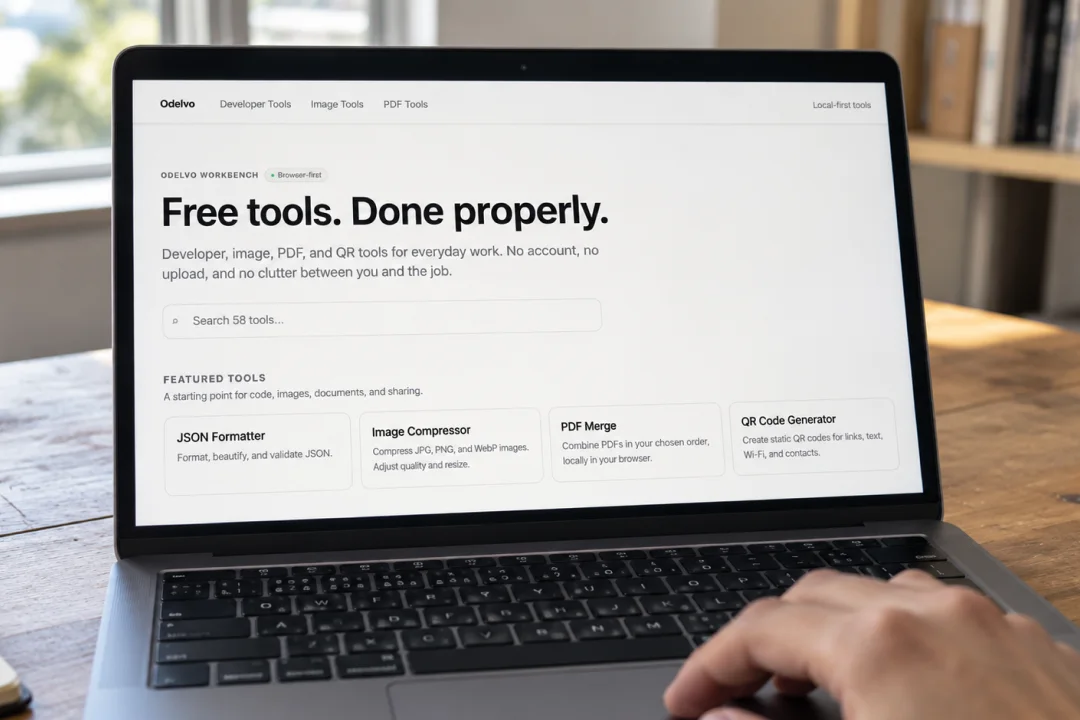
Some digital tasks are small enough that you should not need another account or a desktop application to complete them. You might need to reduce an image before publishing it, combine a few PDFs, or turn a website link into a QR code.
Odelvo brings tools for these everyday jobs into one website. Its collection covers images, PDFs, developer utilities and text, with a searchable homepage to help you find the tool you need.
Prepare images for your website
The Image Compressor lets you choose an output format, adjust quality and optionally reduce an image’s dimensions. You can then download the result for use on a website or in other digital work.
Compression settings affect the final image, so check the downloaded version before publishing. Keeping your original gives you the option to try different settings later.
Bring PDF documents together
Odelvo’s PDF Merge combines multiple PDFs into one document. Choose your files, arrange their order and download the combined PDF.
This can be useful when putting supporting documents together for an application or preparing several files for a client. Check the finished document, especially if the originals contain forms, bookmarks or digital signatures.
Make JSON easier to read
For developers, the JSON Formatter adds consistent indentation to valid JSON. It also includes options to check syntax, create compact output and copy or download the result.
Formatting helps with readability. Invalid JSON still needs its syntax errors corrected.
Create a QR code for a link
The QR Code Generator creates static codes for website links, text, Wi-Fi details and contact information, with PNG and SVG downloads.
A static code contains fixed information. If you change the link you want it to contain, generate a new code and test it before sharing or printing.
Start with the task you need
Odelvo says its tools process inputs in your browser rather than sending source files to a processing service. The tools are available without creating an account.
Visit Odelvo, search for your task and open the relevant tool to get started.